
INSTRUCTIONAL DESIGN CASE STUDY

What Do You Want To Be?

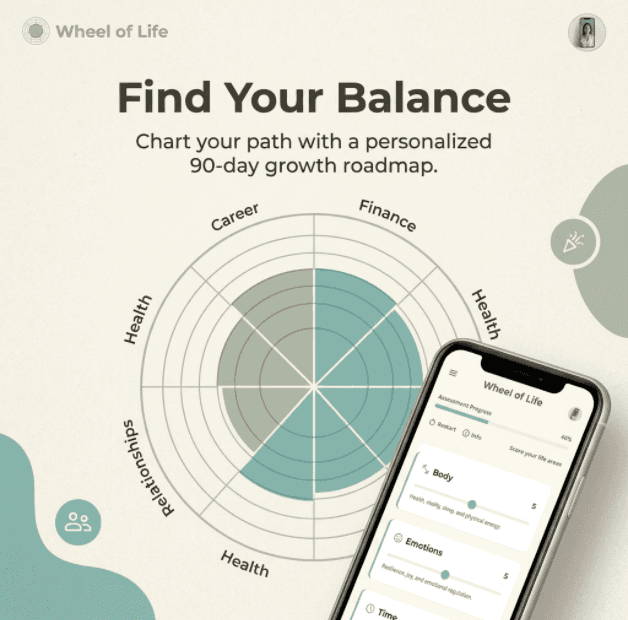
An interactive self-reflection experience that helps adults identify imbalance, prioritise meaningful change, and set practical next steps. Inspired by observations and informal conversations at a live personal growth event led by Tony Robbins, I translated a paper-based coaching exercise into a responsive digital journey learners can revisit over time.

Audience Analysis

Action Mapping

Visual Direction

Web Development

Articulate Rise 360

Wireframes

Web App (Vue JS)

Mini "How-To" Course (Articulate Rise 360)

PROJECT SNAPSHOT

TARGET AUDIENCE

Adults interested in self-development and reflection, particularly those seeking greater direction or balance.

ARTIFACTS

Visual Direction and Style Guide,

Product Requirements Document,

Action Mapping SME Kick Off,

Storyboarding,

Wireframes,
Prototypes,
Visual Design Assets,

Project Handoff Docs,
Web and Mobile Application.

WHAT I DID NOT OWN

The original Wheel of Life framework, this project reimagines an established coaching concept from Tony Robbins as a digital learning experience.

MY ROLE

I led the instructional design, visual direction, prototyping, and developer handoff for this early-stage web experience. My work included synthesising observations and informal conversations into a learner need; defining the instructional goal and learner actions; using action mapping to test assumptions; creating the visual direction, wireframes, interaction flow, and requirements documentation; and producing a responsive web prototype.

For the production I first explored Articulate Storyline and Adobe Captivate to assess interactivity before choosing a web build using Vue JS for the level of interaction the experience required. The final prototype was documented against the PRD requirements so cross functional teams could understand the learning intent, interaction rules, and build constraints in the future.


The experience is a standalone web app rather than a SCORM package because repeat reflection, not completion tracking is the central behaviour. It could be adapted for LMS delivery within future versions of the inital concept.

THE PROBLEM

People feel stuck without knowing why

After attending Tony Robbins’ Unleash the Power Within event, I noticed a pattern: the event workbook was full of powerful self-reflection prompts, but one and two months later, those paper notes weren’t easy to revisit in a way that supported action. Many people struggle not with motivation, but with clarity, they lack a structured way to assess where they are, what feels out of balance, and what specifically needs attention.

The design insight: a digital, interactive version of the Wheel of Life could better support post-event momentum, regular check-ins, and ongoing reflection.

LEARNER OBJECTIVES

What the experience helps learners do

By the end of this learning experience, learners can assess satisfaction across seven key life domains, identify one or more priority gaps where the learner feels unfulfilled. Then they write a structured reflection and define specific next actions/goals to fill the gaps within their life. The learner can return to compare their progress over time and adjust the specific next actions as appropriate.

The assessment page (desktop)

and the following reflections page (from mobile view).

MY PROCESS

From event to interaction

1 Audience insight & analysis: Live observation and informal conversations at a real four-day event revealed a need to sustain deliberate action after the event.

2 Defining the instructional goal: Help people diagnose the gaps between their current life balance and the life they want through self-assessment and reflection.

3 Action Mapping: A kick-off-style session (Live Action Mapping Roleplay) in MindMeister using a custom AI SME and Stakeholder with Perplexity AI and Claude AI to test assumptions and define the learner actions that mattered most.

Live Action Mapping Roleplay Prompt

You are taking part in a live voice-activated Action Mapping session for an instructional design project.


Your role

  • One AI acts as the SME (I will assign your role in moment).

  • One AI acts as the stakeholder (I will assign your role in moment).

  • Stay in role at all times.

  • Respond naturally, briefly, and as if this is a real planning conversation.


Purpose

Help me shape the action map by:

  • clarifying the main performance goal,

  • identifying the most important learner actions,

  • questioning vague or unrealistic steps,

  • checking whether the sequence makes sense,

  • spotting missing actions or decision points,

  • and making sure the map stays focused on outcomes, not content dumps.


As the SME:

  • focus on accuracy, realism, and domain logic.

  • challenge weak or vague actions.

  • suggest better wording when needed.

  • ask what the learner must actually do in the real world.

Stakeholder behaviour

As the stakeholder:

  • focus on business value, learner value, and success.

  • ask why each action matters.

  • challenge anything that feels unnecessary, confusing, or too broad.

  • push for clarity on what success looks like.


Conversation rules

  • Keep responses short and spoken-friendly.

  • Ask one question at a time when needed.

  • Do not lecture.

  • Do not explain instructional design theory unless I ask.

  • Be critical but constructive.

  • If something is unclear, say so plainly.

  • If a step should be merged, split, removed, or rewritten, say it.


Output style

  • Speak in short turns.

  • Use plain language.

  • Focus on the live discussion.

  • End responses with a question or a prompt for my next thought.


Project context

My project is about: [ Project overview goes here].


Begin by asking me what the intended outcome of the learning experience is, then help me build the action map step by step.

4 The PRD and Visual Direction

THE PRD

Why I Wrote a PRD (Not Just a Design Document)

I used one integrated requirements document to connect learning goals, audience needs, interaction rules, visual direction, and technical constraints. It became the shared source of truth for design decisions and developer handoff. On a cross-disciplinary team, this content might sit across a learning design document, UX specification, and technical brief. As a solo project, bringing it together made dependencies visible and kept the prototype aligned with its learning intent.

Creating the Visual Direction

6 Storyboarding
Storyboards are important for communicating design intent across a team. For this project, I built mine after the wireframes were already in place, since the interaction logic was clearer once the screens existed. I then talked AI through each screen’s intended behaviour to produce the formal storyboard document, which sped up the planning process considerably.


Self-reflection questions to ask before storyboarding each screen:


Audience & context: who’s the learner in this exact moment (e.g. just rated their career 3/10)? What’s their emotional state? What device are they on?


Purpose: what’s the ONE thing this screen needs to achieve?
If I deleted it, what breaks in the journey?


Content: is this the minimum needed, or am I over-explaining?


Interaction: what does the learner actually do here (rate, write, drag)?
Is one action per screen enough?


Navigation: can they go back without losing input?
Is there a branch (e.g. a low score triggers an extra prompt)?


Feedback & data: what happens to what they ente, saved, exported to the PDF, scored?


Accessibility: screen-reader label, contrast, keyboard-only path?


Evidence of success: how would a usability test tell me this screen worked?


7 Wireframes, Mock-ups and Prototyping
After I established some solid learning goals it was time to conceptulise things, since my reference materials for the project UPW 2026 by Tony Robbins was actually minimal in terms of visual design.

PROTOTYPES (Web and Android)

TRY THE WEB APP

KEY FEATURES

What makes the experience work

Interactive Wheel of Life, guided reflection prompts, bespoke PDF export, a calm visual language, repeat-use design, and accessible multi-device use work together to keep attention on reflection rather than the interface.

CHALLENGES

What made this hard, and my response

This was a self-initiated concept, not a live client brief.
I grounded the direction in first-hand event observation and informal conversations, while avoiding claims of formal user research.

Challenge: Direct learner and stakeholder testing was not available at this stage.

Response: I used a proxy SME and stakeholder exercise to pressure-test assumptions, recognising that it is a stand-in for—not a substitute for—validation.

Challenge: The Wheel of Life required interaction beyond the practical limits of the authoring tools explored.

Response: I chose a custom web build to create a more flexible, repeatable reflection experience.

HOW SUCCESS IS MEASURED

How success is measured

This tool addresses a behaviour-change goal (life fulfillment), which is inherently long term, but success is measured across layered timeframes so users (and evaluators) see evidence early, not just at the end.

This mirrors formative vs. summative assessment as I've also used within teaching to track learner progress, motivation and feedback.

Immediate action goal to boost momentum.
After the initial life-area assessment, users identify one micro-goal achievable within minutes or hours of starting the learning.

Success here = completion rate of same-day actions and a boost in motivation towards larger goals.


Weekly (short-term progress):

Users set a weekly goal tied to their lowest-scoring life areas.

Success here = check-in completion and self-reported progress on that goal and self-reflection.


Full cycle (long-term outcome):

After 2–3 months, users retake the same life-area assessment.

Success here = measurable score improvement in targeted areas, compared to baseline, also the can reflection on their record notes for a more in depth understanding of how their states have changed.

DESIGNED WITH OUTCOMES IN MIND

What the experience helps learners do

✓ Help people who feel “fine” on the surface gain a clearer view of where life may be out of balance.

✓ Highlight key life areas, health, relationships, career, finances, and meaning.

✓ Support ongoing self-reflection and progress review over time, not a one-time activity.

✓ Present the Wheel of Life as a simple, visually intuitive self-reflection tool.

RESULTS & REFLECTION

What this project taught me

This project strengthened my ability to turn a broad human problem into a structured learning experience: defining learner actions, designing for reflection, translating requirements into interaction flows, and working across visual and technical constraints. It demonstrates how I can bring instructional design, prototyping, and clear handoff thinking together in an early-stage product concept.

Back to top